
I remember the exact moment I realized my videos looked flat and lifeless, no matter how much I tried to improve my camera settings. I had invested in a decent camera, a fancy mic, but my lighting? It was a complete afterthought. That mistake cost me countless hours of frustration and some embarrassing takes before I finally understood that good lighting isn’t an option — it’s essential. And trust me, once I upgraded to softboxes and RGB lights, everything changed.
Why Lighting Can Make or Break Your Content
Lighting isn’t just about brightness; it’s about setting the mood, highlighting your best features, and making your videos look professional. Poor lighting can turn even the most interesting topic into a dull, unwatchable mess. According to a recent survey, viewers judge video quality faster than you’d think — and poor lighting is the top turn-off (source). So, if you’re serious about creating content that stands out, investing in the right lighting setup is a no-brainer.
Have You Faced the Frustration of Poor Lighting?
If you’ve ever shot a video only to discover your face was half-shadowed or the colors looked off, you’re not alone. I’ve been there. Early on, I thought cheap LED panels would do the trick. Spoiler: they didn’t. I made the mistake of ignoring the importance of soft, diffused light and adjustable color settings, which are crucial for creating a flattering and vibrant look. Learning from that mistake, I turned to tools like softboxes and RGB lights, which have become my go-to for professional-quality videos.
In this post, I’ll guide you through the best lighting solutions for creators in 2024 — from softboxes that give you that smooth, natural look to RGB lights that add versatility and personality to your setup. Whether you’re filming tutorials, vlogs, or streaming live, these tools will elevate your content and save you from endless retakes.
What to Expect Next
Ready to transform your videos? We’ll explore the top softbox and RGB light options, how to choose the right ones for your space, and tips for setting them up like a pro. Plus, I’ll share some common pitfalls to avoid, so you don’t repeat my early mistakes. Let’s get started on creating a lighting setup that makes your videos shine!
Set Up Softboxes for Flawless Lighting
Begin by positioning your softbox at a 45-degree angle to your face, slightly above eye level. This creates natural, flattering shadows, avoiding the dreaded flat look. When I first tried this, I used a cheap softbox with a basic LED bulb; the result was a noticeable improvement, but it was still a bit harsh. Upgrading to a high-quality softbox with diffused light made my skin glow and eliminated unflattering shadows. For detailed guidance, check out this comprehensive softbox setup guide.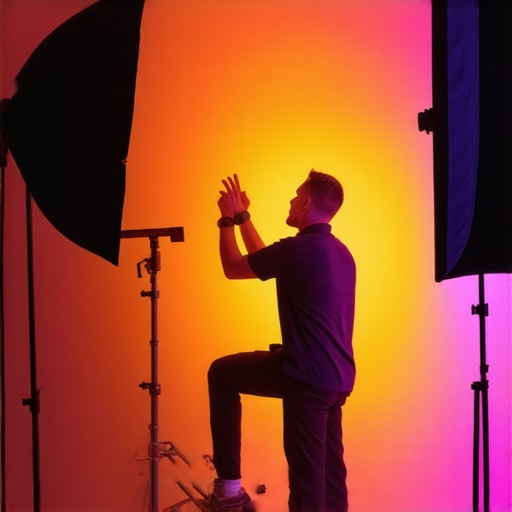
Position RGB Lights for Versatile Effects
Next, add an RGB LED panel behind or beside your camera for color versatility. Use the app or remote to dial in warm tones for a cozy vibe or vibrant colors for dynamic backgrounds. I once set my RGB panel to a deep blue during a late-night stream, which instantly changed the mood and engaged viewers more. Experiment with different hues to match your content’s tone. For best results, explore top RGB panel recommendations and learn how to integrate them seamlessly into your setup.
Fine-Tune Your Lighting Placement
Adjust the distance and angle of your softbox and RGB lights to achieve even, flattering illumination. Keep the softbox close enough to soften shadows but not so close as to cause hotspots. Move your RGB lights farther back or side to add depth and color without overpowering your main light. I spent hours experimenting in my tiny studio, finally finding that a softbox about 2 feet from my face and an RGB panel at a 30-degree angle produced the cleanest look. Use a mirror or your camera’s preview to check the balance and avoid overexposure or shadows. For additional tips, review this expert advice on lighting positioning.
Control and Adjust for Professional Results
Leverage dimmers and app controls to tweak brightness and color temperature on the fly. When I first started, I relied solely on manual knobs, which made quick adjustments tricky. Now, with remote-controlled RGB panels and dimmable softboxes, I can instantly adapt to changing conditions or different scenes. This flexibility is crucial for professional-looking videos. Regularly check your camera feed during setup to ensure consistent exposure and color balance. For more detailed control techniques, visit this in-depth guide.
Many content creators believe that simply having a softbox or RGB light is enough to elevate their videos, but the truth runs deeper. In my experience, the real challenge lies in understanding the subtleties that can make or break your lighting quality. A common myth is that brighter always equals better, but in reality, overexposure can wash out your features and reduce detail, especially when your camera’s ISO or aperture isn’t properly adjusted. Additionally, many overlook the importance of light direction and color temperature consistency, which are critical for achieving a professional look. For example, mismatched color temperatures between your key and fill lights can cause unnatural skin tones and color shifts that distract viewers. According to a study by the University of California, visual consistency in lighting significantly enhances viewer engagement and perception of quality (source).
Let’s dig deeper into what most creators get wrong and how to fix these advanced mistakes that often go unnoticed.
Why does light placement matter beyond the basics?
Many creators set up their lights at a fixed angle and forget to consider how slight adjustments can dramatically improve the softness and shape of shadows. A softbox placed at exactly 45 degrees is good, but fine-tuning its angle and distance can help you sculpt your face better, adding depth and dimension. Moving your RGB lights to create subtle color gradients can also add a professional touch, but only if you understand how to balance the hue and intensity. This nuanced control is what separates amateur setups from truly cinematic ones. For an in-depth look into these advanced techniques, check out this detailed guide.
Remember, the goal is to create a harmonious lighting environment where each element complements the others rather than competing for attention. Overlighting or mismatched light temperatures can make your scene look artificial, which defeats the purpose of professional quality.
Have you ever fallen into this trap? Let me know in the comments.
By mastering these nuanced aspects of lighting, you’ll avoid common pitfalls and set your videos apart. Whether it’s adjusting your softbox’s angle or dialing in the perfect color temperature, these small details have a big impact on your overall production value. So, take the time to experiment and refine your setup — your viewers will notice the difference.
Once you’ve invested in quality lighting like softboxes and RGB panels, the next crucial step is ensuring these tools stay in top shape over time. Proper maintenance not only prolongs the lifespan of your equipment but also guarantees consistent, professional results in every shoot. In this post, I’ll share specific methods and tools I personally rely on to keep my lighting setup running smoothly, along with insights into where this trend is heading in the future.
How do I maintain my lighting gear over time?
Routine cleaning is the foundation of effective maintenance. I use a soft microfiber cloth to gently wipe dust and fingerprints from my softboxes and LED panels after each session. For stubborn dirt or grease, a mixture of mild soap and water does the trick—just ensure the lights are unplugged and completely dry before reuse. Regularly inspecting power cords and connectors for wear is vital; I replace frayed cables immediately to prevent shorts or damage. A good practice is to keep a small toolkit with screwdrivers and replacement parts handy, so you can address minor repairs on the fly without disrupting your workflow.
To keep my RGB lights operating at peak performance, I rely on software updates. Manufacturers often release firmware updates that enhance functionality, fix bugs, or improve color accuracy. I make it a habit to check for updates weekly via the manufacturer’s app or website. This habit ensures my lights benefit from the latest features and remain compatible with other gear in my setup. For instance, I recently updated my RGB panels, which improved color calibration and added new scene modes, saving me time during setup and guaranteeing better visual consistency.
Investing in quality tools for maintenance
Beyond cleaning and software, I swear by a few tools that make maintenance easier and more effective. A compressed air can is invaluable for removing dust from vents and hard-to-reach areas inside LED panels. I also keep silica gel packets in my equipment case; they absorb moisture and prevent fogging or corrosion inside sensitive electronics. For calibrating my lights, I use a lux meter and colorimeter—these precise tools help me measure brightness and color temperature accurately, ensuring my setup remains consistent across different sessions. If you’re serious about professional-grade results, investing in these tools pays off in the long run.
Looking ahead: The future of lighting maintenance
As technology advances, I predict more manufacturers will incorporate self-diagnostic features and automated calibration in their lighting systems. Imagine RGB panels that can automatically detect and correct color drift or brightness inconsistencies, saving you time and effort. Additionally, the rise of IoT-enabled studio equipment will allow remote monitoring and maintenance alerts, making it easier to troubleshoot issues before they affect your production. Staying ahead of these trends means embracing smart tools and keeping your gear up-to-date with the latest firmware and software releases.
If you haven’t already, try incorporating regular software updates and simple cleaning routines into your maintenance schedule. These small steps can dramatically improve your lighting reliability and output quality, ensuring your videos always look their best. Remember, well-maintained equipment is the backbone of professional content creation—invest in it, and it will reward you with long-lasting performance and stunning visuals.
The Costly Lessons Good Lighting Taught Me
One of the most valuable lessons I learned was that lighting isn’t just a technical detail — it’s the foundation of professional-looking videos. I used to think that a decent camera could do all the work, but I soon realized that poor lighting ruins even the best shot. It took me countless retakes and frustration to understand that soft, well-placed light elevates your content from amateur to cinematic. That lightbulb moment changed everything, and investing in quality softboxes and RGB lights became my game-changer.
Secrets Most Creators Don’t Talk About
Many overlook how nuanced lighting setup can dramatically affect your video’s mood and clarity. I discovered that tiny adjustments in angle and distance can soften shadows or add depth, making your face look more natural and flattering. I also found that mismatched color temperatures between lights can cause distracting skin tones, pulling viewers out of the experience. These subtle tricks took my videos from okay to outstanding, and they can do the same for you if you pay attention to the details.
Tools That Elevated My Studio Setup
My go-to tools are a high-quality softbox for that smooth, natural lighting and an RGB LED panel for creative color effects. For softboxes, I trust this detailed softbox setup guide because it’s comprehensive and easy to follow. When it comes to RGB panels, I rely on top RGB panel recommendations that offer versatile control and vibrant colors. These tools have helped me craft professional scenes without breaking the bank.
Keep Your Lighting Gear Performing Like a Pro
Routine maintenance is key. I regularly clean my softboxes with a microfiber cloth and check my LED panels for dust and loose connections. Firmware updates are a game-changer; I make it a habit to update my RGB lights weekly to benefit from new features and improved accuracy. Investing in tools like a lux meter and colorimeter ensures my lighting remains consistent across shoots. These small but crucial steps keep my setup reliable and my visuals crisp, making every video look polished and professional.
Future Trends Will Transform How You Maintain Your Lights
Looking ahead, I believe that smart, IoT-enabled lighting systems will automatically calibrate themselves and alert us to issues before they become problems. Imagine RGB panels that self-correct color drift or softboxes with built-in diagnostics — the future of studio lighting is about seamless, intelligent solutions. Staying updated with firmware and embracing these innovations will keep your setup ahead of the curve and your content consistently top-notch.
Insider Wisdom That Changed My Approach to Lighting
- Small adjustments matter: Moving a softbox a few inches can soften shadows or add flattering depth, so don’t settle for a static setup.
- Color temperature consistency is critical: Mismatched lights can make your skin look unnatural and distract viewers. Always match your lighting’s hues.
- Invest in quality tools: Software updates, calibration devices, and regular cleaning are investments that pay off by ensuring reliable, professional results every time.
- Don’t overlook the environment: Your backdrop and ambient lighting influence how your lights appear on camera. Fine-tune everything for harmony.
My Essential Gear for Studio Lighting
- Softboxes: They diffuse light beautifully and create a soft, natural look. I use these softboxes for their durability and performance.
- RGB LED Panels: Versatile and vibrant, these panels allow me to experiment with mood and tone. Check out the best RGB panels in 2024.
- Calibration Tools: Lux meters and colorimeters keep my lighting consistent. They’re a must-have for serious creators.
- Firmware and Software: Regular updates ensure my equipment functions flawlessly and takes advantage of new features. Always stay current with manufacturer updates.
Ignite Your Creativity and Light Up Your Content
Now that you understand the nuances of studio lighting and have a toolkit to get started, it’s your turn to elevate your videos. Don’t be afraid to experiment with angles, colors, and setups — the best lighting often comes from trial and error. Remember, every great creator started with a simple setup and learned through experience. Your best content is just a few well-placed lights away. Keep refining, keep experimenting, and let your videos shine brighter than ever before.
What’s the biggest lighting challenge you’re facing right now? Drop your thoughts below and let’s discuss how to overcome it!
Reading through this post really resonated with my own journey into content creation. I initially thought good quality audio and a decent camera were enough, but my videos still looked flat and unprofessional until I finally invested in some proper lighting. Softboxes and RGB panels really made a difference — not just in how my skin looked, but in the entire mood and vibe of my shoots. One thing I learned along the way is that even small tweaks in light positioning can significantly enhance your shot. For example, slight adjustments to the angle or distance can soften shadows or add depth, making your face look more natural and flattering on camera. I wonder how others approach fine-tuning their lighting setups? Do you prefer using apps to control your RGB lights, or do you stick with manual adjustments? I’d love to hear different strategies that others find effective.
I totally agree with the point about small adjustments making a big difference in lighting. When I started experimenting with my softbox placement, I found that just shifting it a few inches forward or backward transformed the overall look—so much softer and more flattering. It’s incredible how much nuance there is in creating that perfect balance. I’ve also been playing around with RGB lights and using apps for control, which makes fine-tuning much more seamless during live shoots. But I wonder, for those who prefer manual adjustments—how do you ensure consistency across different sessions? Do you use any particular tools or markers to remember your ideal setup? Personally, I keep a simple checklist and take quick photos after finding the right configuration; it saves me time when I need to replicate the lighting. Lighting is so crucial, and I think mastering these small tweaks can really elevate your content to professional levels. Would love to hear more tips on achieving perfect balance and consistency in varying environments!
This post really hits home for me because I’ve spent countless hours trying to improve my lighting without much success. It’s true, I was tempted to overlook the importance of softboxes and adjustable RGB lights, thinking basic LED panels would suffice. But after some trial and error, I realized that the key isn’t just in having good gear — it’s in mastering the placement and control of that gear. I especially agree with the idea that small tweaks, like adjusting the softbox slightly higher or changing the hue of your RGB panel, can make a big difference in the final look. Personally, I’ve started using a simple checklist and take snapshots of my setup, so I can replicate it across shoots. Has anyone tried using colorimeters or lux meters for precise adjustments? Would love to hear whether such tools are worth the investment for improving consistency, especially in different lighting environments.
This post really strikes a chord with me because I recently upgraded my lighting setup and the difference is night and day. I used to rely on simple LED panels, but once I invested in a softbox and added RGB lights, my videos instantly looked more professional and inviting. What really helped was learning how to fine-tune the positioning—placing the softbox at a 45-degree angle and experimenting with the distance. I also love using my RGB app to switch colors on the fly during live streams; it adds a dynamic feel that keeps my audience engaged. I’ve found that consistent light placement is crucial, so I always take photos of my setup after I get it right for each shoot. Has anyone here tried self-calibrating tools like colorimeters or lux meters? I’m curious if they’re worth the investment for those of us aiming for that perfect, consistent look across different environments.
I totally relate to the importance of precise lighting, especially when I first started creating videos. It’s surprising how much a small tweak in the softbox’s angle or distance can change the mood and clarity of your shot. When I upgraded to a dimmable softbox and started experimenting with RGB panels, it was a game-changer—my skin looked more natural, and I could easily adjust the colors to match different scenes. I also found that keeping a detailed setup checklist and taking quick photos of my preferred configurations helps me maintain consistency across multiple shoots. One thing I’ve been curious about is how others handle color accuracy over time—do you rely solely on software controls, or do you calibration tools like colorimeters make a noticeable difference? I’d love to hear your thoughts or tips on maintaining perfect lighting consistency, especially in fluctuating environments. It’s these small, deliberate adjustments that truly elevate the quality of our content.