
It was late at night, and I was desperately trying to record a simple YouTube video. My camera was ready, my microphone was set, but the lighting? Total chaos. Shadows cast weird patterns, colors looked off, and I could feel my confidence slipping away with every take. That was my “aha” moment—realizing that no matter how good your camera or mic is, poor lighting can ruin everything. Have you ever faced that frustration? If yes, then you’re not alone, and today, we’re going to fix that.
Why Your Lighting Setup Can Make or Break Your Content in 2024
Effective lighting isn’t just about illuminating your face; it defines your entire aesthetic. Whether you’re streaming, filming tutorials, or creating content for social media, good lighting elevates your video quality, engages viewers, and can even reduce post-production work. The right combination of softboxes and RGB lights offers versatility and color accuracy that were once affordable only to big studios. But here’s the thing—there’s a vast array of options, and choosing the best can feel overwhelming. I’ve made plenty of mistakes early on, like relying only on cheap, single-source lights, which left my videos looking flat and dull, or investing blindly in flashy RGB panels without understanding their capabilities.
For instance, I once bought an expensive RGB panel because of hype, only to find out it lacked the brightness I needed and complex controls that slowed down my workflow. That’s why I always recommend checking out comprehensive guides like [this one](https://lights.creatorsetupguide.com/top-rgb-and-softbox-lighting-solutions-for-studio-video-creators) for trusted advice.
The good news? There are now smarter, more flexible lighting solutions available. In this post, I’ll share how to pick the perfect softbox and RGB lights tailored for your needs—whether you’re a hobbyist or a professional—saving you time and money while leveling up your video quality.
Ready to shed some light on your setup? If you’ve ever felt lost in the sea of lighting options, stay tuned. We’re about to simplify your choices and help you create studio shots that stand out.
Set Your Foundation with Proper Placement
Begin by positioning your softboxes at a 45-degree angle from your face, slightly above eye level. This minimizes shadows and produces a flattering, natural look. Use lightweight stands to experiment with angles until you find the most even, diffuse light. Remember, placement directly affects color temperature and shadow softness, so take your time here.
Understand Your RGB Lights for Creative Control
RGB panels are like color chameleons. They offer customizable hues, allowing you to match your aesthetic or set a mood. Think of them as an artist’s palette—you can dial in warm sunset tones or cool blues. To avoid washing out your subject, keep saturation moderate and use soft white presets as a baseline. For a more immersive experience, incorporate a remote control or app to fine-tune lighting without disrupting your shot.
Control Brightness and Diffusion for Flawless Results
Adjust intensity settings on your softboxes and RGB panels individually. Softboxes inherently diffuse light through their fabric, but adding diffusion sheets or baffles enhances softness further. This prevents harsh shadows and highlights, especially important when close to your camera lens. Think of diffusion as a gentle blanket wrapping your subject in a soft glow—this technique is vital for professional-looking videos.
Balance Colors with White Balance Settings
Matching your camera’s white balance with your lighting ensures color accuracy. Set your camera to custom white balance or preset modes aligned with your light’s temperature. For instance, if your RGB lights emit a bluish hue, adjust the camera to compensate, maintaining natural skin tones. Sometimes, a quick test shot reveals mismatched colors, so always verify before recording your main content.
Use Light Modifiers to Shape Your Scene
Modifiers like barn doors, grids, or snoots help control spill and focus the light precisely where you want it. For example, a grid attached to your softbox can create a spotlight effect, perfect for emphasizing a particular scene or subject detail. This technique is akin to using a sculptor’s chisel—refining your lighting to craft the desired mood.
Experiment and Fine-Tune for Best Results
Effective lighting isn’t just about equipment—it’s about your skill in adjusting it. Spend dedicated time tweaking angle, intensity, and color to see how each change affects your footage. A messy initial setup often leads to surprising discoveries. Think of it as a studio dance; the more you practice, the more intuitive your adjustments become.
For a comprehensive overview of combining softbox and RGB lighting effectively, check out this guide. It covers advanced techniques for mastering your studio environment and achieving professional-grade results.
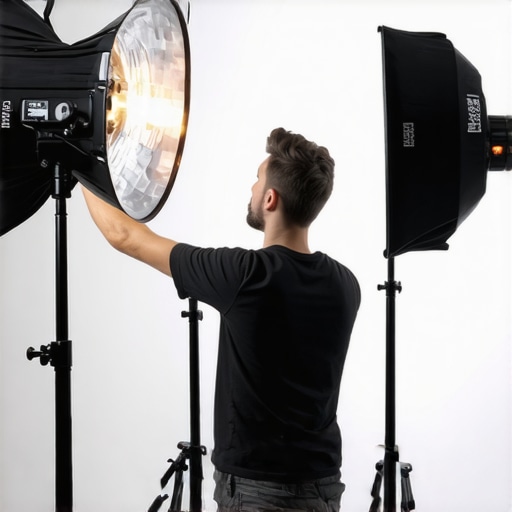 Many creators fall into misconceptions when setting up RGB lights and studio lighting, often to their detriment. A widespread myth is that brighter RGB panels automatically translate to better footage, but in reality, overexposure can wash out skin tones and distort colors—something most seasoned videographers avoid by adjusting brightness thoughtfully. Additionally, some believe that RGB lights are only useful for creative effects; however, their true strength lies in precise color calibration and mood setting, provided you understand their nuance and limitations. One trap to watch out for is relying solely on preset modes without customizing settings—this can lead to inconsistent color rendering, especially in mixed lighting environments. For example, using RGB modes that emphasize overly saturated hues can sometimes result in unnatural skin tones when improperly balanced with your camera’s white balance settings. According to lighting expert Peter McKinnon, mastering your color temperature and saturation levels is crucial for professional results, and this cannot be achieved by blindly following default presets.
What advanced color matching techniques can improve your RGB lighting consistency?
Mastering complex color matching involves understanding your camera’s RGB profiles and how they interact with different light sources. Using tools like a color calibration card and adjusting your camera’s custom white balance can significantly improve matching accuracy between your RGB panels and ambient light. It’s also advisable to invest in high-quality, color-accurate LED panels, as cheaper options often compromise color fidelity, leading to subtle shifts that can ruin a shot. For comprehensive guidance on choosing the right RGB lights that suit your professional or creative needs, explore detailed comparisons and expert reviews in guides like this collection of top solutions. Remember, understanding these nuances and avoiding common myths will elevate your lighting game, helping you produce content that looks polished and professional. Have you ever fallen into this trap? Let me know in the comments.Keeping your studio lighting setup reliable over time requires more than just good initial investments; it demands consistent maintenance and the right tools. As a creator, I rely on a few specific solutions that ensure my RGB lights, softboxes, and LED panels stay in top shape, providing professional results consistently.
A dedicated power meter like the **Blue Sea Systems Digital Multimeter** helps me monitor voltage and ensure my LED panels receive consistent power, preventing flickering or color shifts. Regularly checking cables and connectors with this tool allows me to catch issues early, extending the lifespan of expensive equipment.
Cleaning is often overlooked but critical. I use compressed air cans—like the **Dust-Off Compression Tool**—to remove dust from vents and fans without risking damage. Dust buildup can cause overheating, which shortens the life of LEDs and internal components. For delicate lenses or diffusion fabrics, microfiber cloths and specialized lens wipes are my go-to, ensuring clarity and diffusion quality.
Calibration software plays a crucial role in maintaining consistent color output. I use **SpectraCal’s CalMAN** whenever I notice shifts in color accuracy. This software allows me to recalibrate RGB panels and softboxes accurately, ensuring that my whites remain true and skin tones natural.
In terms of scaling, automation tools like **DMX controllers** enable me to manage multiple lights simultaneously, adjusting brightness and colors with preset scenes. This not only saves time during shoots but also ensures consistency when recreating setups, which is vital for branding content.
Prediction-wise, the trend points toward smarter, self-maintaining lighting systems. Future innovations may include AI-powered diagnostics that alert you to potential failures before they happen, ensuring uninterrupted content creation.
How do I maintain my lighting rigs for longevity?
Regularly inspecting cables and connectors, cleaning components, and recalibrating your lights are key to longevity. Incorporate weekly check-ups with tools like a multimeter and calibration software. Establish a routine cleaning schedule to prevent dust accumulation and overheating, which can significantly extend your equipment’s lifespan.
Investing in high-quality, reliable tools is crucial. For example, a good multimeter and calibration software like **SpectraCal’s CalMAN** allow me to fine-tune and verify my lighting’s performance, avoiding costly replacements or inconsistent shots. I highly recommend trying out a calibration routine with your RGB panels—it can dramatically improve your footage quality and save you time in post-production. For premium solutions suited to professional setups, check out the comprehensive options detailed at [this guide on RGB and softbox lighting solutions](https://lights.creatorsetupguide.com/top-rgb-and-softbox-lighting-solutions-for-studio-video-creators).
Three Surprising Lessons That Transformed My Lighting Approach
One revelation was the importance of light direction; I used to believe intensity alone mattered, but I learned that positioning softboxes at the right angles creates depth and natural skin tones, preventing flat visuals. Another lesson was that color harmony between RGB lights and my skin tones isn’t automatic—custom calibration and understanding color temperature nuances made a visible difference. Lastly, I discovered that regular maintenance and calibration, rather than high-end gear alone, sustain professional results—simple tools like multimeters and software can extend my kit’s lifespan and consistency.
My Go-To Resources for Mastering Studio Lighting
For in-depth knowledge, I trust the comprehensive guides on top RGB and softbox lighting solutions—they help me choose equipment that balances quality and affordability. The book Lighting for Creators has expanded my understanding of color theory and placement, transforming my shoots. I rely on this guide for advanced setup techniques, ensuring my studio stands out. Finally, tools like calibration software keep my lighting consistent across projects.
Keep Moving Forward, and Don’t Be Afraid to Brighten Your World
Every creator’s journey with studio lighting is unique, but the key is to start experimenting and refining. Remember, mastering softboxes and RGB lights isn’t about having the most expensive gear—it’s about understanding how to use what you have effectively. With patience and curiosity, you can craft a lighting setup that elevates your videos and helps your personality truly shine through. Take action today; your audience will thank you for the effort.