
Ever find yourself frustrated while filming, only to realize that your studio lights are casting unwanted shadows or spilling light onto areas you didn’t intend to illuminate? I remember countless nights battling with softboxes and LED panels, trying to keep my backgrounds quiet and my subjects perfectly isolated. One evening, after yet another struggle with light bleed ruining my shots, a lightbulb went off. I realized that typical softbox setups often leave gaps, causing light to leak where it’s not supposed to. This realization transformed my approach, pushing me to explore more effective methods to control off-axis light, especially with the upcoming challenges of 2026’s complex RGB lighting environments.
Why Controlling Light Spill Has Never Been More Crucial
In today’s content creation landscape, where high-quality visuals are king, the importance of precise lighting cannot be overstated. Light spill not only ruins the aesthetics of a shot but can also affect the color accuracy, especially as RGB softboxes and LED panels become more prevalent. According to recent studies, poor lighting control can decrease viewer engagement by up to 30%, making it clear that every detail counts — and that includes ensuring every ray of light hits only where you want it to.
Is Softbox Grid Tactics Actually Worth the Hype?
When I first heard about using grids on softboxes, I admit I was skeptical. My early mistake was assuming that a simple grid was just a fancy accessory, not a necessity. That mistake led to more wasted time and inconsistent results. It wasn’t until I understood that grids act as a precise tool to block stray light while allowing your main source to shine — quite literally — that I truly appreciated their value. Want to see what makes them so effective? Check out this comprehensive guide to softbox and RGB lighting that covers the latest tactics for perfect control.
If you’ve faced similar issues with light spill sabotaging your shoots, you’re not alone. But don’t worry — the solutions are simpler than you think, especially once you master the art of grid application. Ready to dive into proven techniques that keep your light where it belongs? Let’s start transforming your studio setup right now.
Adjust Your Softbox Placement for Precision Lighting
Begin by positioning your softboxes close to the subject to minimize spill, similar to pinning a shadow directly where it’s needed. Use adjustable stands with flexible arms to fine-tune angles quickly, much like adjusting a flashlight beam on a stage. I once set up a softbox too far, resulting in unwanted background glow, which I corrected by moving it closer and angling it down, reducing spill and sharpening the subject separation.
Implement Grids Smartly to Enforce Light Containment
Attach grids to your softboxes to create a controlled beam, akin to narrowing a garden hose spray to direct water precisely. Start with a 30-degree grid for softer edges, then tighten to 20 degrees for sharper focus. When I first used grids, I noticed a significant reduction in spill, but I also had to compensate for some loss in brightness by increasing the light intensity carefully. This method is essential when working with RGB lights, as it prevents color bleed into unintended areas. For detailed instructions, check out our comprehensive guide.
Utilize Flags and Barn Doors to Block Off Excess Light
Place flags or barn doors directly in front of your lights to cut off light that escapes sideways or backwards. Think of it as using curtains to block sunlight from spilling onto walls. During a shoot, I attached cardboard flags to my LED panels, which effectively shielded reflections and spill into neighboring areas, resulting in cleaner shots. For best results, make sure flags are snug against the light source to prevent light leaks, and consider using black matte materials to avoid reflections that could reintroduce unwanted spill.
Employ Gels and Filters to Manage Color Spill
If color spill becomes an issue, especially with RGB lights, applying color-correcting gels or filters can help. Imagine it as sunglasses for your lights, filtering out unwanted hues. I once experimented with a green gel on a spill that was affecting skin tones, which helped blend the colors seamlessly. Be cautious with intensity, as gels can dim your lights; balance is key. For comprehensive methods, consult this detailed article.
Leverage Distance and Modifiers for Better Control
Increasing the distance between lights and the subject naturally softens and concentrates the beam, reducing spill. Pair this with modifiers like snoots or honeycomb grids that act as funnels, concentrating the light just where needed. I once extended the distance and added a honeycomb grid to a key light and achieved a clean, focused illumination with barely any spill, even in a confined space. Practice adjusting both distance and modifiers simultaneously to find the sweet spot for your setup.
Take Advantage of Room Geometry and Surfaces
Arrange your studio to maximize natural barriers—using furniture, walls, or curtains—to block light from bouncing into unwanted areas. For example, positioning a bookcase behind your setup can act as an effective shield. I once improvised with black foam boards to contain spill in a tight room, which remarkably improved image clarity. Remember, controlling light spill is as much about the environment as it is about the gear.
Applying these concrete steps transforms your studio lighting, ensuring your subject is crisply lit with minimal unwanted spill. Mastery of placement, modifiers, flags, and environmental setup allows for professional results even in challenging spaces. If you want to dig deeper, review the latest equipment options that support precise control with RGB and LED systems.
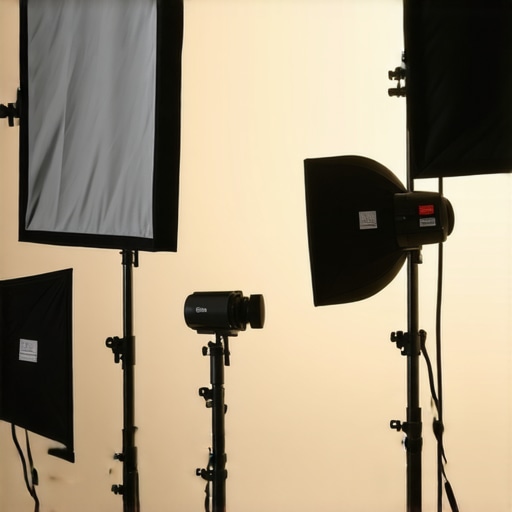
While many content creators focus on choosing the right RGB lights, softboxes, or LED panels, there’s a layer of complexity that often gets overlooked—one that can make or break your video quality. The widespread misconception is that more expensive equipment or higher wattage automatically guarantees perfect lighting. In reality, understanding specific nuances, such as color rendering accuracy and proper settings, is crucial for professional results. For instance, many assume that all RGB LED lights are interchangeable, but in practice, differences in color fidelity and control features dramatically affect the final output. Overlooking these details can lead to muddy colors or unnatural skin tones, which are often difficult to correct in post-production. Want a concrete example? Check out this article on fixing softbox glare that also touches on avoiding common color issues with RGB lighting.
Are All RGB Lights Truly Compatible with Professional Studio Settings?
This is where many get misled. Compatibility isn’t just about plug-and-play; it encompasses spectral output, controllability, and integration with existing gear. For example, some affordable RGB panels have narrow color spectra, causing skin tones to shift unpredictably. This can be especially problematic when matching multiple lights or integrating with high-CRI softboxes. According to a recent study by Lighting Research Center, spectral quality greatly influences how viewers perceive the professionalism of your footage—poor spectra can make even well-lit scenes look unnatural. Thus, investing in RGB lights that offer full-spectrum control and excellent color rendering isn’t just a luxury; it’s a necessity for advanced setups. For in-depth insights and solutions, explore their guide on RGB LED panel solutions.
Another common trap is neglecting proper calibration and color management protocols. Setting your lights without verifying their output can lead to inconsistent footage that appears fine on your monitor but off on other screens. Regular calibration with color meters or software tools ensures your lighting remains consistent and true to color. Additionally, many overlook the importance of testing light placement and modifiers to avoid unintended color spills or hotspots, especially when working with RGB lighting. Learning to fine-tune these nuances elevates your content from amateurish to broadcast-quality. If you haven’t yet, review this comprehensive guide for mastering softbox and RGB lighting strategy.
So, what’s the most overlooked aspect that can sabotage your studio lighting? It’s often the assumption that equipment alone makes the difference, rather than a nuanced understanding of how to control, calibrate, and optimize it. Mastering these elements transforms your setup from decent to professional. Don’t fall into the trap of static gear knowledge—keep experimenting and adjusting for your unique space and production goals. Have you ever fallen into this trap? Let me know in the comments.
Ensuring your lighting setup remains reliable over time requires more than just initial calibration; it calls for deliberate maintenance and strategic tool use. One indispensable tool I rely on is the Datacolor SpyderX Elite, a color calibration device that ensures consistent color output from my LED panels and softboxes. Regular calibration with this device, roughly every six months or after significant setup changes, guarantees that color shifts don’t creep into your footage—something especially vital when working with RGB lights where color accuracy is king. Also, I always keep spare replacement parts like bulbs, gels, and power supplies from trusted brands such as Aputure or Godox, so I can swiftly swap out components that degrade over time.
Another critical aspect is maintaining your physical equipment. Clean your softboxes and LED panels with a lint-free cloth to prevent dust buildup, which can reduce light output and create uneven diffusion. For LED panels prone to overheating, I use the cooling accessories—like fans or heat sinks—that extend the lifespan of the lights and maintain optimal brightness levels. Consistently inspecting and replacing worn-out parts ensures your lights don’t fail unexpectedly during crucial shoots.
If you’re scaling your setup, investing in robust power management tools becomes essential. Using a smart power strip with surge protection and remote monitoring allows me to shut down or reboot my entire lighting rig remotely, avoiding potential electrical issues that could damage delicate electronics. As equipment advances, I predict that integrated IoT-enabled lighting systems will become the norm, offering real-time diagnostics and automatic adjustments — saving time and preventing accidents.
How do I maintain my lighting system over time?
Implementing a routine maintenance schedule, including regular calibration, cleaning, part replacement, and electrical checks, ensures long-term performance consistency. I also recommend documenting your settings and setups in a dedicated log, so you can quickly restore optimal conditions after any adjustments or repairs. For managing complex lighting environments, software controls like Lightroom or Luminar AI can help fine-tune colors and brightness digitally, reducing manual adjustments over time. Routine upkeep prevents minor issues from escalating into costly repairs and keeps your studio lights performing at their best for every project. Want to make your system idiot-proof? Try activating a monthly check and calibration ritual, and see how much more consistent your footage becomes.
The Hard-Earned Secrets That Elevated My Lighting Game
One of the most overlooked lessons I’ve learned is how small adjustments can make a huge difference in professional-quality lighting. I once believed that buying expensive RGB lights and softboxes was enough to achieve perfect shots. However, the real game-changer was discovering the power of strategic placement and control tools like grids and flags. These lessons weren’t handed to me—they came through countless trials, errors, and finally, understanding that mastery lies in attention to detail. Now, I always remind myself: precision in lighting isn’t about more gear but better technique. Think about how my approach with light modifiers and environmental setup transformed my workflow and shot quality—proof that learning the nuances pays off exponentially.
My Go-To Resources for Seamless Lighting Control
If you’re serious about perfecting your studio lighting, a few tools and sources have become indispensable. The ultimate guide to softbox and RGB lighting opened my eyes to advanced control techniques that minimize spill and color bleed, especially in RGB setups. For calibrating expensive LED panels to ensure consistent skin tones, I rely on the best cooling and maintenance practices—which directly impact color accuracy. The RGB LED solutions overview helps me choose gear optimized for flexibility and control. Lastly, the tips for softbox glare reduction ensure my shots are crisp and clutter-free. These resources are foundational to my setup’s reliability and quality.
Your Next Step to Brighter, Better Videos
Remember, mastering light spill control is about intentionality and continuous learning. The more you experiment with placement, modifiers, and environmental adjustments, the more your videos will stand out. Every small tweak can drastically elevate your visual storytelling—don’t settle for mediocre lighting. Dive deeper into proven techniques, revisit your setup regularly, and don’t be afraid to test new gear or methods. You’ve got the tools and knowledge now; it’s time to put them into action and transform your content creation journey. Are you ready to take control of your studio lighting and see the difference it makes? Let me know how you plan to improve your setup below.
This discussion on controlling light spill is incredibly relevant for anyone working in small or confined studio spaces. I’ve experienced firsthand how a slight misjudgment in light placement or neglecting to use flags can result in unwanted reflections or color bleeding, especially with RGB lights. My approach has always included test shots from multiple angles to identify potential spill points, and I’ve found that combining flags with strategic room setup—like black foam boards or curtains—makes a surprisingly big difference. One thing I’d add from my experience is the importance of keeping your gear properly maintained; dust on diffusion panels or old gels can subtly reduce light quality and increase issues. I’m curious, how do others balance the placement of multiple lights to ensure uniform coverage without overlapping spill zones? I’d love to hear different techniques for managing complex setups with several light sources.