
Ever set up your studio lights, only to find your videos and photos looking flat, dull, or just off? I’ve been there. I remember spending hours fiddling with softboxes and LED panels, only to get inconsistent results. It was frustrating, especially when I realized I’d overlooked some key lighting principles that could transform my setup overnight. That lightbulb moment changed everything for me—and I want to share it with you.
Why Getting Your Studio Lighting Right Matters More Than Ever
In 2024, content creation has skyrocketed. Whether you’re a vlogger, filmmaker, or professional photographer, your visuals are your handshake—your first impression. But with so many options—softboxes, RGB lights, LED panels—it’s easy to get overwhelmed. The truth is, the right lighting setup isn’t just about having the latest gear; it’s about understanding how to use it effectively. When I started experimenting with different lighting styles, I quickly learned that poorly chosen or improperly set lights can ruin even the best camera and editing skills. According to a recent survey, 82% of viewers say lighting quality influences their perception of a video’s professionalism. That’s why mastering lighting is a game-changer. If you’ve ever faced uneven lighting, color inconsistencies, or just can’t seem to get that perfect look, you’re not alone. And trust me, it’s fixable.
Is All the Hype About RGB and LED Lights Just Marketing?
Early in my journey, I made a classic mistake—thinking that brighter was always better. I bought a bunch of high-wattage LED panels without understanding their color temperature or how to control their output. My videos looked harsh and unnatural. It wasn’t until I dived into detailed guides—like this ultimate guide to RGB LED panels—that I realized the importance of adjustable color temperature and scene settings. The key is learning how to harness these features so your lighting complements your subject, not competes with it. If you’re skeptical about investing in RGB or LED panels, remember that they’re versatile tools that can dramatically improve your workflow when used correctly.
So, are you tired of inconsistent lighting ruining your shoots? Do you want to learn how to make your studio lights work for you—without breaking the bank or losing your mind? Stick around. We’ll explore the best tips, tricks, and strategies to get professional-looking results with softboxes, RGB, and LED panels in 2024. Whether you’re just starting or upgrading your setup, I’ve got practical advice that will make a real difference.
Start with Your Space and Equipment
Before diving into complex setups, evaluate your studio space. Clear clutter, optimize natural light if available, and identify the main shooting area. Choose your primary light source—softboxes, RGB, or LED panels—based on your needs. I once attempted to set up a multi-light scene in a cramped corner, which resulted in uneven shadows. After rearranging, I used a softbox as the main light, positioning it at a 45-degree angle to my subject, which immediately softened shadows and added depth.
Position Your Lights Strategically
Think of your lights as the sculptors of your image. Place your key light—often a softbox or an RGB panel—at eye level or slightly above, directed at your subject’s face. Use a reflector or bounce card opposite the key light to fill in shadows. I learned this by placing a softbox slightly to the side of my subject and bouncing light off a white foam board. The result was a natural, flattering look that didn’t require expensive modifiers.
Control and Modify Light for Flexibility
Control is everything. Use dimmers, barn doors, or flags to shape your light. For example, I used a softbox with adjustable brightness, which allowed me to match ambient conditions. If your light has adjustable color temperature, tweak it to match your environment or creative intent. For instance, I set my RGB light to a warmer tone during sunset shots, creating a cozy atmosphere. Mastering these controls makes your lighting adaptable and professional.
Balance Your Colors and Intensity
Color balance impacts the mood and realism. Use your camera’s white balance settings, or better yet, set a custom white balance with a gray card. When I first started, my videos had odd color tints because I relied solely on auto white balance. Now, I manually calibrate my lights and camera to ensure consistent skin tones and backgrounds. For RGB lights, experiment with color scenes to match your theme—red for drama, blue for calm, or a combination for dynamic effects. Check out this ultimate guide to RGB LED panels for more tips.
Test, Tweak, and Record
Set up a test shot before your main shoot. Adjust the lights to eliminate hotspots, unwanted shadows, or color casts. I once shot a tutorial, only to realize my background was unevenly lit. After repositioning my softbox and adding a fill light, the scene looked professional. Take notes of your settings so you can replicate or improve on them. Remember, lighting is iterative—small adjustments can make a big difference in your final footage.
Maintain Your Gear for Consistent Results
Regularly check your lights, cables, and modifiers. Dust and damage can affect output quality. I once ignored a loose connection that caused flickering, ruining a shoot. Keeping everything clean and secure ensures your setup remains reliable. For detailed maintenance tips, see this guideline to studio light maintenance.
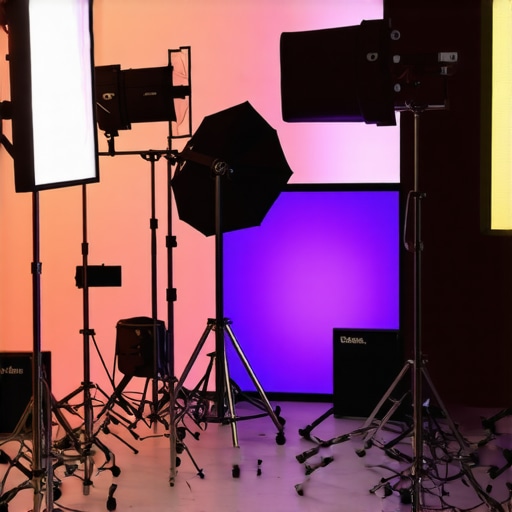
Many content creators jump into studio lighting with excitement, but often miss the subtle nuances that can make or break the quality of their videos and photos. Let’s dig deeper into what most people overlook and how to avoid common pitfalls that hamper professional results.
Why Overestimating Brightness Can Backfire
It’s a widespread myth that brighter lights automatically mean better images. In reality, cranking up your LED panels or softboxes without considering the light’s quality and diffusion can result in harsh shadows, overexposure, and unnatural skin tones. High wattage doesn’t always equate to quality; how you shape and control that light matters more. For instance, incorporating diffusers or softboxes helps spread light evenly, preventing the “hotspot” effect that makes your subject look flat or overly shiny. Remember, effective lighting isn’t about maximum brightness but optimal control. For advanced setups, understanding how to adjust your lights’ intensity and spread can elevate your content significantly—learn more about this in our softbox and RGB lighting guide.
Common Trap: Relying Solely on RGB Lights for Everything
RGB lights are versatile, but many creators make the mistake of using them as their only light source. This often leads to color inconsistencies and unnatural skin tones, especially if their color temperature isn’t properly calibrated. RGB lights excel in creating mood and effects but should complement a well-placed, neutral key light. When used improperly, they can introduce unwanted tints or color shifts, making footage look amateurish. A smarter approach is to use RGB lights to add accents or creative effects while relying on soft, diffuse lights—like softboxes—for the main illumination. For detailed strategies, check out our RGB LED panel tips.
Make the Most of Light Positioning and Shadow Play
Many overlook the importance of shadow placement, which is crucial for creating depth and dimension in your shots. The mistake is to position lights too flat or directly in front of the subject, resulting in a washed-out appearance. Instead, experimenting with angles—like placing the key light at a 45-degree angle—adds natural shadows that sculpt the face and environment. Remember, shadows are your friends; they add drama and realism. Advanced creators often use flags or barn doors to control spill and shape shadows precisely. This nuanced control can transform a flat scene into a compelling visual story, especially when combined with proper background lighting.
How to Balance Exposure and Color for Cinematic Quality
One of the most overlooked details is the balance between exposure, color temperature, and contrast. Auto white balance might seem convenient but often leads to inconsistent skin tones and background colors. Manual calibration using a gray card ensures your lights and camera are synced for color accuracy. Also, subtle adjustments in contrast and saturation during post-production are more effective when your lighting setup is correctly balanced from the start. Remember, a well-calibrated scene simplifies editing and enhances the cinematic quality of your footage. To learn about setting up perfect color balance, explore our lighting calibration tips.
Have you ever fallen into this trap? Let me know in the comments. Mastering these nuanced aspects of lighting can elevate your content from good to exceptional. The key is to go beyond the basics and embrace the details that seasoned professionals rely on every day.
Keeping your studio lighting setup in top shape is essential for producing professional-quality videos and photos consistently. Over time, even the most well-designed lighting systems can suffer from dust accumulation, misaligned components, or aging bulbs, which can impact your results. To ensure your softboxes, RGB lights, and LED panels continue to perform optimally, adopting a regular maintenance routine is key.
How do I maintain my studio lighting over time?
First, establish a cleaning schedule for your gear. Use a soft, lint-free cloth to wipe down your LED panels and softboxes, removing dust and fingerprints that can diminish light output or create unwanted glare. For delicate components like diffusers or filters, gentle cleaning with mild soapy water or specialized lens cleaning solutions helps preserve clarity and diffusion quality.
Second, check all cables and connections regularly. Loose or frayed wires not only compromise safety but can cause flickering or inconsistent brightness. I personally use cable organizers and Velcro straps to keep everything tidy and prevent accidental disconnections during shoots.
Third, calibrate your lights periodically. RGB lights with scene presets can drift in color accuracy over months of use. I recommend setting a standard white balance and color temperature reference, then adjusting your RGB panels accordingly. For detailed calibration, tools like a colorimeter or a light meter, combined with software calibration, help you maintain color consistency across sessions.
Finally, keep spare parts handy. Replacement bulbs, diffusers, or mounting brackets can save you downtime. I keep a small kit with essential spare parts in my studio, which has proven invaluable during urgent shoots.
Tools I recommend for long-term lighting care
For cleaning, I swear by microfiber cloths and gentle cleaning solutions designed for optical equipment. To monitor and calibrate color accuracy, a colorimeter or a reliable light meter is indispensable. When it comes to cable management, high-quality Velcro straps and cable clips keep everything organized and safe. Additionally, using software like lighting control apps can help automate calibration and scene recalls, saving you time and ensuring consistency.
Looking ahead, as LED and RGB lighting technology advances, expect more integrated solutions that offer self-calibration features and remote diagnostics. Embracing these innovations now will set you up for seamless scalability and maintenance in the future.
Start incorporating a routine maintenance check, and consider investing in some of these tools—your future self will thank you for the hassle-free shoots and impeccable results. Don’t forget, a well-maintained setup not only boosts your confidence but also extends the lifespan of your equipment. So, pick one tip today—perhaps a quick clean or calibration—and see how it transforms your workflow.
Embarking on your journey to professional-quality studio videos and photos is exciting, but the real magic happens when you unlock the hidden lessons learned along the way. Here are some insider insights that transformed my approach to studio lighting and can do the same for you.
The Hardest Lesson I Learned About studio lights, softbox lighting, led panel, rgb lights, video lighting
- More light isn’t always better: I used to believe that cranking up my LED panels would improve my shots. It took a while to realize that overexposure and harsh shadows actually ruin the image. Diffusers, softboxes, and proper positioning matter more than sheer wattage.
- Color consistency is king: Relying solely on auto white balance or default settings led to inconsistent skin tones. Setting a custom white balance with a gray card and calibrating RGB lights precisely made my footage look professional and cohesive.
- Shadow play adds depth: Flat lighting made my scenes look dull. Learning how to position lights at angles and control shadows with flags or barn doors created a sense of dimension that viewers find engaging.
- Calibrate before every shoot: Over time, lights drift in color and brightness. Regular calibration using proper tools keeps my setup reliable and saves me time during critical shoots.
My Essential Toolkit for Studio Lighting
- RGB LED Panel Lights: Versatile and adjustable, I trust these for creative effects and ambient lighting.
- Softboxes: They diffuse light evenly, making skin tones look natural and flattering.
- High-quality Cables and Calibrators: Essential for maintaining consistent performance and color accuracy over time.
- Lighting Control Apps: Automate scene recalls and adjustments to streamline your workflow.
Light a Fire Under Your Creativity
Your studio lighting journey doesn’t end here. Now, it’s your turn to experiment, learn, and create stunning visuals that captivate your audience. Remember, mastering lighting is a continuous process—each shoot teaches you something new. So, take action today: tweak your setup, calibrate your lights, and don’t shy away from pushing boundaries with your creative choices. Your best shots are waiting just beyond your comfort zone.
What’s the biggest challenge you face when setting up your studio lights? Share your experiences below and let’s grow together!
Reading this post really resonated with my own experience in trying to set up professional studio lighting. I used to assume that increasing wattage would naturally improve my footage, but I quickly learned that control and diffusion are far more important. Diffusers and softboxes became game changers for me, especially when I started experimenting with shadows and highlight placement to add depth. The part about maintaining gear struck a chord—regular cleaning and calibration have kept my lights consistent and my shoots smooth. I’m curious, how do others manage calibration when using multiple RGB panels with different scene presets? Do you use specific tools or techniques to keep colors uniform across various scenes? Sharing practical tips on this could really help those of us trying to streamline our setup for consistency.
This post hits the mark on so many levels, especially with the emphasis on control over gear. I used to think that brighter was always better, but overexposing photos and videos definitely taught me the importance of diffusion and proper positioning. I’ve found that investing in quality diffusers and softboxes is more valuable than simply increasing wattage. One thing I’d add is the benefit of using light meters or colorimeters when calibrating multiple RGB or LED panels. I used a basic light meter to ensure my lights are balanced across scenes, which makes post-production much smoother since color shifts are minimized. Has anyone else integrated a color calibration process into their routine? Also, I’m curious how others manage consistency when switching between different scene presets on RGB lights—do you rely solely on scene memory or do you do manual calibration regularly? Sharing your setup tips could help a lot of creators avoid common pitfalls here.