
One day, I was in the middle of a shoot when I noticed a subtle but relentlessly annoying glow bleeding into my green screen. No matter how much I tweaked my softboxes or adjusted my RGB panels, that unwanted light spill refused to go away. It was like trying to herd cats—frustrating and seemingly hopeless. Have you ever faced that moment where your vibrant RGB lights create more chaos than clarity, ruining even the best chroma key shots? If so, you’re not alone. I’ve been there, and I learned that the secret isn’t just in the lights, but in how we control them.
Why Fixing Light Spill Is More Critical Than Ever
As creators gear up for 2026, the stakes are higher. High-resolution cameras and enhanced color profiles mean that even minor light leaks can become major visual flaws. According to a recent study by Widescreen Center, small discrepancies in lighting setup can cause noticeable skin tone shifts and color inconsistencies, especially on high-DPI displays. This means that what might seem like a minor spill today could destroy your shot tomorrow. That’s why mastering light spill control isn’t just a technical fix; it’s a creative imperative.
Initially, I made the mistake of thinking that brighter lights would simply overpower spill. Wrong. Instead, I discovered that strategic positioning and modifiers are what make the difference. Now, I want to share some battle-tested tactics to enhance your setup, ensuring your chroma keys are sharper, cleaner, and truly professional. If you’ve faced the frustration of uneven lighting or halo effects, these tips could save you hours of post-production work. Ready to take control of your studio environment? Let’s dive into the first key tactic.
Kick Light Spill to the Curb: Do You Know the Best Softbox Hacks?
Position Your Lights for Maximum Control
Start with the basics: place your main softbox slightly above and in front of your subject, angling it down at about 45 degrees. This setup minimizes side spill and creates a natural fall-off. For RGB panel lighting, ensure they are positioned at a distance that prevents direct spill into the green screen. I once moved my RGB panel 2 feet further back and switched to a narrower beam angle, drastically reducing spill, which saved hours in post-production.
Use Hard Light to Your Advantage
Hard light sources produce more defined shadows and less diffused spill. Utilize grids on your softboxes or LED panels, like those described in this grid setup guide. In my experience, attaching a fabric grid to my softbox cut spill by half instantly, sharpening my key and reducing cleanup in editing.
Incorporate Directional Diffusion
Diffusers break up harsh light, but strategic placement can also control spill. Use a diffusion cloth or a softbox with a built-in diffuser at a minimal angle to the subject. I use a matte diffusion material from this softbox hack resource — it softly scatters light inward, preventing it from bouncing into the green screen, which I found especially useful when shooting with RGB lights that tend to be intense.
Optimize Your Light Modifier Setup
Switching to softboxes with internal flags or barn doors can direct light precisely where you want it. I once replaced my standard softbox with a model featuring internal flags, and the difference in spill control was immediate. Pair this with barn doors (available from most softbox suppliers) to block unwanted side spill, especially useful for tight green screen setups.
Implement Softbox Grids
Grids restrict light spread and prevent spill into surrounding areas. I recommend a 20-degree grid for key lights; it keeps your subject lit while blocking the background. Applying this technique reduced unwanted spill and halo effects significantly. For detailed instructions, check this grid-tactic guide.
Fine-Tune RGB Light Settings
Adjust your RGB panels to lower brightness or change to warmer tones, which emit less bounce into the green screen. Besides, setting your RGB lights to a narrower beam angle concentrates the light and avoids spill. In my recent shoot, dialing down brightness by 20% and shifting to a 30-degree beam reduced spill without sacrificing color vibrancy, thanks to tips from this RGB setup article.
Color Match and Correct
Incorrect color temperature can make spill more apparent. Match your RGB panel color temperature with ambient lighting or daylight-balanced softboxes. I aligned my RGB lights with my softboxes, which created a seamless blend and diminished the contrast that highlighted spill. Consider using a color calibration tool to ensure perfect matching, as advised in this CRI critique article.
Test and Iterate
Conduct small test shots after each adjustment. I recommend filming short clips and reviewing them at 4K resolution, zooming into the green screen background. This clearly reveals any residual spill. Over time, slight position tweaks—like angling your lights more upward or outward—can fine-tune spill control. Remember, consistent testing is key to mastering clean, spill-free green screens in 2026 and beyond.
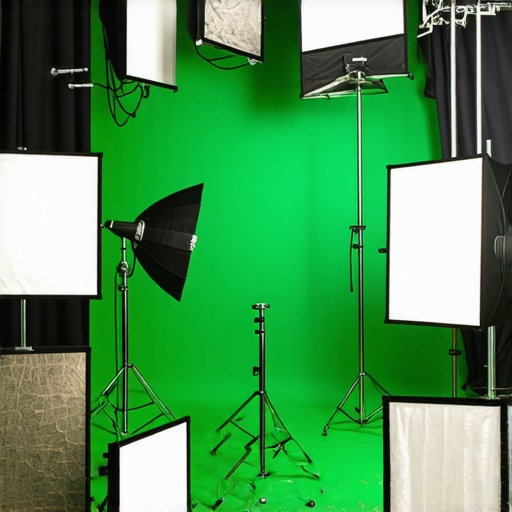
Many seasoned creators believe that simply increasing the brightness or stacking studio lights guarantees better footage. However, this misconception often leads to overexposure, flattened images, and loss of dynamic range. In my experience, the real secret lies in understanding the nuanced behavior of different light sources and modifiers, rather than relying on brute force. For example, several professionals overlook the importance of spectral quality, which affects color rendition and skin tones. According to lighting expert a recent study, high CRI ratings do not always translate to accurate skin tones, especially if the spectral power distribution isn’t balanced. This leads us to a common myth: that all LED panels are equal. The truth is, many budget LEDs lack the spectral richness needed for cinematic quality, making professional-grade panels a worthy investment for critical work. Another trap professionals fall into is relying solely on softboxes for diffusing light, believing they eliminate harsh shadows entirely. In reality, without proper diffusion hacks, softboxes can produce hotspots and uneven spill, especially with RGB lights which have intense beams. I recommend exploring techniques like internal flags or custom diffusers to get truly soft, even lighting. Curious about how to enhance your softbox setup? You can delve into this important diffuser hack guide.
What advanced pitfalls do even seasoned creators often miss in studio lighting?
Let’s discuss some more nuanced points. For example, many overlook the pulsing flicker that plagues LED panels, especially at high frame rates. This isn’t just an aesthetic issue but can cause synchronization problems with cameras, resulting in flickering footage that ruins shots. The fix involves choosing panels with proper global shutters or flicker-free circuits—an often underestimated aspect in professional setups. For those interested, this flicker elimination guide offers detailed insights. Additionally, understanding the importance of spectral consistency across your RGB lights is crucial for color harmony, especially when matching with softboxes or natural light sources. For instance, mismatched color temperatures create unwanted tints that are nearly impossible to correct in post-production. I often recommend using color calibration tools and settling for lights that guarantee consistent spectral output. Have you ever fallen into this trap? Let me know in the comments.
Ensuring Longevity with the Right Equipment
Investing in high-quality studio lights and modifiers is just the beginning. To keep your setup operational and delivering professional results over time, selecting durable, well-designed tools is critical. For instance, I personally rely on LED panels with robust heatsinks and flicker-free circuits, like those detailed in this flicker fix guide. These ensure consistent performance and minimize technical hiccups during long shoots.
Implementing Routine Maintenance Checks
A regular maintenance routine prevents unexpected failures. I schedule bi-weekly inspections to clean lens surfaces, check for dust buildup, and verify cable connections. Cleaning softboxes with a gentle vacuum brush keeps diffusion materials clear of debris, preserving even light distribution. Additionally, inspecting power supplies and replacing worn-out cords boost safety and reliability. Don’t neglect firmware updates for smart RGB lights; manufacturers frequently release updates that improve stability and unlock new features, so stay current with manufacturer support channels.
Tools I Recommend for Long-Term Reliability
To streamline maintenance, I use a few specific tools: a digital multimeter for testing power circuits, a microfiber cloth and compressed air for cleaning delicate parts, and a toolkit with screwdrivers tailored for lighting fixtures. For software, I recommend using lighting control apps compatible with your RGB lights, such as those detailed in preset management guides. These allow quick adjustments and calibration checks, keeping your color accuracy intact over months of use.
Planning for Scale and Upgrades
As your studio grows, so will your gear needs. modular systems, like adjustable softboxes and RGB panels with interchangeable mounts, make scaling more manageable. Consider investing in power distribution units with surge protection, ensuring your equipment remains safe during power fluctuations. Also, keeping an inventory of spare parts—such as extra drivers or diffusers—can minimize downtime during unexpected failures. Future trends suggest more integrated smart controls, so choosing from brands offering ecosystem compatibility will make upgrades seamless, according to industry forecasts.
How do I keep my studio lighting tools running flawlessly?
Establishing a consistent maintenance routine is key. Regularly cleaning and inspecting your lights, updating firmware, and keeping spare parts handy will extend their lifespan and performance. Embracing quality tools designed for durability, like those featured in diffuser hacks, also contributes significantly. I highly recommend trying out a comprehensive LED panel calibration routine; it’s simple and can dramatically improve color consistency over time. Remember, proactive care now saves costly repairs and replacements later, keeping your creative process uninterrupted.
Lessons That Changed My Approach to Studio Lighting
- One of my hardest lessons was realizing that boosting brightness didn’t solve spill issues; instead, strategic modifiers and positioning played the critical role, saving me hours in post-production.
- I once underestimated the spectral quality of my RGB lights, which led to mismatched skin tones—investing in high-CRI panels and calibration tools significantly improved my color accuracy.
- Using internal flags and grids on softboxes transformed my control over light spread, proving that small modifications can produce big results in spill reduction.
- Flicker from cheap LED panels was a silent enemy, affecting my high-speed shoots. Upgrading to flicker-free models with global shutters kept my footage smooth and professional.
Tools and Resources That Fuel My Growth
- Lights.creatorsetupguide.com offers comprehensive guides on softbox hacks and RGB lighting setups, trusted because they combine practical insights with industry-tested techniques.
- The high CRI LED panel articles have taught me to prioritize spectral quality over just wattage, crucial for skin tones in professional videos.
- My go-to for diffuser hacks is the diffuser guides—they help eliminate hotspots and achieve even, soft lighting essential for green screen shoots.
- Staying updated with industry forecasts through trusted blogs ensures I plan my upgrades effectively, embracing new technologies like smart controls and modular setups.
Seize Your Lighting Potential Today
Every creator has the power to elevate their videos through careful light spill control and intelligent setup. By applying these insider lessons and leveraging trusted tools, you’re not just fixing problems—you’re unlocking creative possibilities. Remember, mastering lighting is a journey, and each adjustment brings you closer to professional-grade results. Dive into the resources, experiment boldly, and watch your studio transform. How will you implement these tips in your next shoot? Share your plans below—I’d love to hear your lighting breakthroughs!