
Ever tried setting up your studio lights only to be met with harsh shadows or colors that look more like a sunset than a professional video? I remember the lightbulb moment when I realized my lighting was more of a distraction than an enhancement. It was frustrating, especially when I invested in what I thought were top-tier lights, only to find my videos still looked flat and unappealing. Sound familiar? If you’ve faced similar struggles, you’re not alone. The good news is, with the right approach to RGB and softbox lighting, you can transform your studio into a professional-quality setup that makes your content pop. Today, I’m going to walk you through everything you need to know to elevate your lighting game in 2024, no more guesswork, just results.
Why Proper Lighting Is the Heart of Studio Video Quality
Lighting isn’t just about illuminating your face; it’s about setting the mood, highlighting details, and conveying professionalism. Poor lighting can ruin even the best camera and microphone. When I first started, I underestimated how much lighting affected my videos. I thought good content alone was enough — turns out, it’s 50% lighting. If you want your viewers to focus on you, not your shadows or color casts, investing in the right RGB and softbox lights is essential. The right setup can make your skin look natural, your background vibrant, and your overall video more engaging. Whether you’re creating YouTube tutorials, professional interviews, or personal vlogs, proper lighting is the secret ingredient that separates amateurs from pros.
In 2024, the options are more versatile and affordable than ever. From RGB LED panels that can change colors on the fly to softboxes that soften and diffuse harsh light, the right tools can dramatically boost your production quality. But with so many options, how do you choose? That’s where this guide comes in. We’ll explore the best lighting solutions for different needs, common pitfalls to avoid, and practical tips to get the most out of your setup.
Are RGB & Softbox Lights Actually Worth the Hype?
Early in my journey, I bought a fancy RGB LED light without understanding how to use it properly. The result? Colors that looked fake, inconsistent lighting, and wasted money. It’s a mistake I see many creators make: jumping into high-tech gear before mastering the basics. The truth is, RGB and softbox lighting are powerful, but only if used correctly. When combined thoughtfully, they can give your videos a professional look that stands out. If you’re skeptical about whether investing in these lights is worth it, ask yourself: do you want your videos to look better, more vibrant, and more professional? If yes, then the answer is a resounding yes. For a detailed breakdown of how to select the best RGB and softbox solutions, check out this comprehensive guide to choosing softbox RGB lighting in 2024.
Getting the right lighting setup isn’t just about aesthetics; it’s about efficiency and confidence. When I finally understood how to position my lights and use color temperature effectively, my workflow improved and my videos looked way more polished. And trust me, your audience will notice the difference too.
Now, let’s dive into the practical steps that will turn your studio into a lighting powerhouse. Ready to shed some light on your content? Let’s go!
Choose the Right Lights for Your Space
Start by assessing your studio environment. Do you have natural light that needs controlling, or is your space windowless? For most creators, a combination of softbox and RGB LED panels offers flexibility. I once set up my softbox directly in front of my camera, mimicking natural light, which instantly softened my shadows. For vibrant color effects, add an RGB LED panel to introduce dynamic hues. To explore top solutions, check out this guide to selecting softbox RGB lighting. 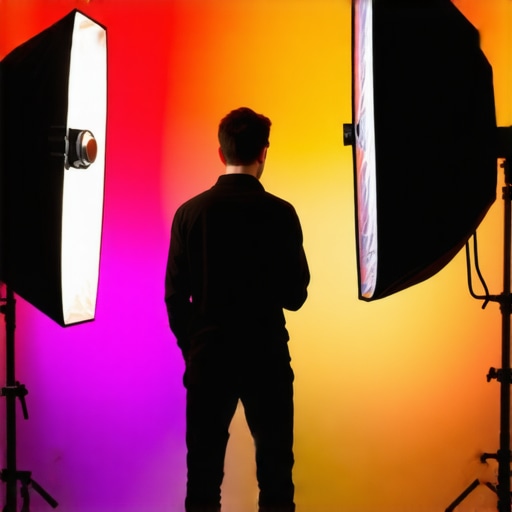
Position Your Lights for Flattering Results
Proper placement is key. Think of your lights as the seasoning in a recipe—too much or too little ruins the dish. Place your softbox at a 45-degree angle to your face, slightly above eye level, and tilt it down. This creates natural, flattering shadows. Use a second RGB light behind you or to the side for background color or accent. I once experimented with placing my softbox too close; the light was harsh and unflattering. Moving it back a little softened the shadows and made my skin glow. For detailed positioning tips, see this lighting positioning guide.
Adjust Light Intensity and Color Temperature
Fine-tuning your lights makes a big difference. Softboxes generally have adjustable dimmers—set yours to a comfortable brightness that illuminates without washing out details. RGB panels often let you control both brightness and color. I remember spending an afternoon experimenting with different color temperatures; matching my softbox to my camera’s white balance gave a seamless look. Use your lights’ remote controls or apps for quick adjustments. For optimal settings, consult this RGB LED panel tutorial.
Balance Shadows and Highlights
Creating depth involves balancing light and shadow. If shadows are too harsh, diffuse your softbox further or add a bounce reflector opposite the light. A simple white foam board can bounce light back, filling in shadows naturally. I once used a piece of white poster board to bounce soft light onto my darker side, which softened shadows without flattening the image. Adjust your RGB lights’ hue to complement your skin tone and background, making the scene more immersive. For advanced tips, see this shadow balancing guide.
Experiment with Creative Effects
Once your basic setup is dialed in, have fun with colors. Use your RGB panel to create mood—cool blues for calm, warm reds for intimacy. Change colors in real-time if you’re streaming or recording. I once switched from neutral to deep purple lighting mid-video, which added a dramatic flair and kept viewers engaged. Remember, subtlety is key; avoid over-saturating unless you want a stylized look. For inspiration, check out this creative color techniques.
Test and Refine Your Setup Regularly
Lighting isn’t a set-and-forget deal. Regularly review your footage, especially as your setup changes or you upgrade gear. I make it a habit to record short test clips after any adjustment, checking how the lighting interacts with my skin, background, and camera settings. Use your camera’s histogram and waveform monitors to verify exposure and color accuracy. With consistent testing, you’ll develop an intuitive sense of how to tweak your lights quickly. For ongoing tips, see this lighting maintenance guide.
While many creators invest in top-tier lights like RGB panels, softboxes, and LED fixtures, they often overlook the nuanced mistakes that can sabotage their entire setup. Let’s dig deeper into some of the most common misconceptions and hidden traps that even seasoned videographers fall into. Understanding these pitfalls can save you time, money, and frustration.
Why Brightness Isn’t Always Better
One of the biggest myths is that cranking up your lights makes your video look more professional. Actually, overexposure, harsh highlights, and blown-out backgrounds are signs of excessive brightness. More light isn’t necessarily better; it’s about quality, diffusion, and proper placement. For example, a softbox at 50% intensity often produces a more flattering look than a full-power LED panel. Remember, controlled and diffused light creates depth without harsh shadows. Check out this softbox and RGB lighting guide for more insights.
Misconception: RGB Lights Are Just About Colors
Many creators think RGB lights are only useful for adding vibrant hues. While color effects are fun, the real power lies in their ability to fine-tune white balance and create subtle mood shifts. Relying solely on color-changing features can lead to inconsistent skin tones or unnatural scenes. Instead, use RGB lights to complement your softboxes, adjusting brightness and hue for a balanced, professional look. For detailed strategies, explore this RGB lighting system overview.
Avoid the Over-Decorating Trap
It’s tempting to add multiple RGB panels and decorative lights, but more isn’t always better. Overloading your scene with colored lights can distract viewers or create unnatural color casts. Instead, focus on key light placement and use RGB lights sparingly for accents or mood. A well-balanced setup with one key softbox and one secondary RGB panel often outperforms cluttered, overly colorful arrangements. Check out this lighting arrangement tips.
How to Spot and Fix Common Mistakes
One sneaky mistake is neglecting the impact of your background and environment. Reflections, color spills, and uneven light distribution can undermine even the best gear. Regularly test your setup with short clips, checking for unwanted shadows or color inconsistencies. Use a waveform monitor or histogram to verify exposure and white balance. This proactive approach can prevent costly re-shoots and post-production fixes. For expert advice, read this video lighting troubleshooting guide.
Have you ever fallen into this trap? Let me know in the comments. Mastering the nuances of studio lighting elevates your content from amateur to professional, so take the time to learn these hidden secrets. Remember, great lighting isn’t just about the gear; it’s about how you use it.
Investing in top-tier studio lights, softboxes, and RGB panels is only part of the equation. To keep your equipment performing at peak levels over time, proper maintenance and smart tool choices are essential. Regular upkeep not only prolongs the lifespan of your gear but also ensures consistent, professional-quality lighting for every shoot. In this section, I’ll share the exact tools and methods I use to keep my studio lighting in top shape, along with predictions on where this trend is headed in the future.
How do I keep my lighting equipment in prime condition?
First, I always stock up on high-quality cleaning supplies like microfiber cloths and electronic contact cleaners. Soft, lint-free cloths are perfect for wiping down LED panels and softboxes without scratching surfaces. For cleaning cables and connectors, I rely on contact cleaner sprays, which prevent corrosion and maintain optimal electrical conductivity. I personally prefer Cyber Clean gel balls because they easily lift dust and dirt from vents and fan grills without disassembly. Regularly inspecting cables for frays or exposed wiring is crucial; I replace any damaged cords immediately to avoid shorts or fire hazards.
When it comes to software, I use manufacturer apps to update firmware on my RGB LED panels. Staying current with updates improves stability, adds new features, and patches security vulnerabilities. For example, my RGB LED panels firmware updates have improved color accuracy and responsiveness, making live adjustments smoother. I schedule firmware checks once every quarter to ensure my setup remains reliable and optimized.
What tools do I rely on for long-term results
Consistency is key, and I rely on a few specialized tools to achieve this. My light meters help me set precise brightness levels and color temperatures, ensuring uniformity across shoots. I also use a color calibration tool like the Datacolor SpyderX to calibrate my monitors, so what I see on screen matches the actual lighting conditions. This is especially critical when adjusting RGB color mixes or fine-tuning white balance.
In the future, I predict that smart, IoT-enabled lighting systems will become more prevalent. These systems will offer remote diagnostics, predictive maintenance alerts, and automatic firmware updates, making upkeep even easier. As these technologies mature, I expect creators will spend less time on manual troubleshooting and more on creative experimentation.
Ready to level up your maintenance routine?
Start by investing in a good contact cleaner and a reliable light meter. Schedule quarterly firmware updates and inspect cables regularly. These small steps will save you headaches and keep your lighting setup performing flawlessly for years. If you want to explore the best tools for your studio, check out this comprehensive guide to studio lighting tools. Give your gear the care it deserves, and it will reward you with stunning, consistent results every time.
The Hardest Lesson I Learned About studio lights, softbox lighting, led panel, rgb lights, video lighting
One of the most eye-opening lessons came when I realized that more brightness often leads to harsher shadows and unflattering results. It’s tempting to crank up your lights to make everything pop, but subtlety and diffusion create a more natural, professional look. I used to believe that intensity was the key, but I learned that controlled, soft lighting produces depth and dimension that truly elevates your videos.
3 Myths About studio lights, softbox lighting, led panel, rgb lights, video lighting That Held Me Back
First, I thought RGB lights were just about adding vibrant colors. Turns out, their real power lies in fine-tuning white balance and creating mood with subtle hues. Second, I believed that investing in multiple lights always improves quality. Overloading a scene with colored or bright lights can be distracting and counterproductive. Third, I assumed that softboxes are only for portraits. In reality, they’re versatile tools that soften any scene, even in high-motion or dynamic recordings.
What Experts Won’t Tell You About studio lights, softbox lighting, led panel, rgb lights, video lighting
Most professionals keep their exact setups and positioning techniques close to the chest, but I’ve learned that strategic placement and color control are game changers. For example, placing a softbox at a 45-degree angle slightly above eye level creates natural, flattering shadows, while RGB panels used sparingly add vibrancy without overwhelming your scene. These subtle tricks make a significant difference in the final result.
Curated Recommendations for Lighting Mastery
My Essential Toolkit for Studio Lighting includes the best softbox RGB lighting solutions in 2024—trusted for their reliability and versatility. I also rely on a RGB LED panel with adjustable color temperature for quick adjustments and dynamic effects. For precise brightness control, a light meter helps me maintain consistency across shoots. Lastly, a good monitor calibration tool like the Datacolor SpyderX ensures what I see on screen matches reality, which is crucial for color accuracy.
You’re Ready to Shine: Take Action Now
Lighting mastery isn’t about having the most expensive gear; it’s about understanding how to use what you have effectively. Experiment with placement, adjust your color temperature, and don’t be afraid to create mood with subtle hues. Your content will look more professional, engaging, and authentic. Remember, every great creator started with a simple setup—what matters is your willingness to learn and improve. So, go ahead, shed some light on your content, and watch your videos transform!
Have you ever struggled with finding the perfect placement for your softbox or balancing RGB hues? Let me know below and share your biggest lighting challenge!
This guide resonates so much with my recent experience trying to improve my video setup. I used to think more brightness was always the answer, but after some trial and error, I realized that softer, more diffused lighting makes a huge difference in the overall look. I’ve started experimenting with bounce reflectors and adjusting the position of my softboxes, which really helped reduce harsh shadows and create a more natural skin tone. I especially appreciate the emphasis on balancing shadows and highlights — that’s often overlooked but crucial for a professional feel. Have others found that small tweaks in positioning or adding reflectors can dramatically elevate their videos without additional expensive gear? I’m curious about everyone’s favorite tricks for quick and effective lighting adjustments.
I really appreciate how this post emphasizes not just the equipment but the importance of proper placement and understanding light behavior. I’ve found that even with good lights, experimenting with angles and distances can make a huge difference in softening shadows and enhancing skin tones. For example, using a bounce board opposite the softbox helps fill in shadows naturally without overexposing certain areas. It’s fascinating how small positional tweaks can transform the overall look of my videos. Has anyone tried using reflective surfaces like silver or gold for creative lighting effects? I’ve heard they can add warmth or vibrancy without needing different lights. It’s always a balance, but I think mastering light placement is key before getting into more complex color effects. What are your go-to tricks for quickly adjusting lighting during a shoot to get that perfect shot without needing to redo everything? I’d love to hear different workflows and tips.
This post really hits home for me, especially the part about not just relying on high-end gear but focusing on strategic placement and understanding how light behaves. I’ve found that even with simple softboxes, experimenting with their height and angle can drastically change the quality of your footage. For instance, I often adjust my softbox slightly higher than eye level and at a 45-degree angle, which creates a natural, flattering look and reduces unflattering shadows. Adding a bounce reflector on the opposite side—like a white foam board—can also fill in shadows without making the scene look flat, which I learned through trial and error. I’m curious, what’s your favorite quick fix when you’re in a hurry during a shoot and need to get the lighting just right? Do you prefer using backlights for depth or going for more diffused front lighting? I’d love to hear different approaches from fellow creators trying to optimize their setups without overcomplicating things.
Your post hits the nail on the head — especially about the importance of light placement. I’ve found that simple tweaks, like raising the softbox a few inches higher or angling it differently, can really change the entire vibe of my videos. The bit about bouncing light using white foam boards or even reflective surfaces like silver or gold is a game changer in my setup. I tend to keep my background lights minimal but love experimenting with color accents to add depth. For quick fixes, I often keep a small reflector handy to fill shadows and adjust my softbox brightness based on the natural ambient light present. This way, I can maintain a consistent look without overcomplicating things. Have you guys tried any unique DIY tricks to improve lighting on a budget? Also, how do you decide when to use colored lights versus warm white? Would love to hear everyone’s go-to tips for efficient, professional-looking lighting in a limited setup.